Modern businesses need fast, reliable, and personalized communication to build strong customer relationships. Whether a company sends order confirmations, appointment reminders, payment alerts, promotional messages, or account notifications, customers expect timely updates through their preferred communication channels.
Managing these communications separately can create unnecessary work, inconsistent customer experiences, and missed opportunities. This is where WhatsApp, SMS and Email API integration becomes valuable.
By connecting WhatsApp, SMS, and Email APIs with websites, mobile applications, CRM platforms, ERP software, and business automation systems, companies can manage customer communication through a unified workflow.
But how do these three communication channels actually work together? What are their individual benefits, and how can businesses use them to improve customer engagement?
Let's explore how WhatsApp, SMS and Email APIs work together to create an efficient, automated, and scalable business communication system.
What Are WhatsApp, SMS and Email APIs?
An API (Application Programming Interface) allows different software applications to communicate and exchange information.
WhatsApp, SMS and Email APIs enable businesses to send, receive, and automate messages directly from their existing software systems without manually opening individual messaging platforms.
For example, when a customer purchases a product from an e-commerce website:
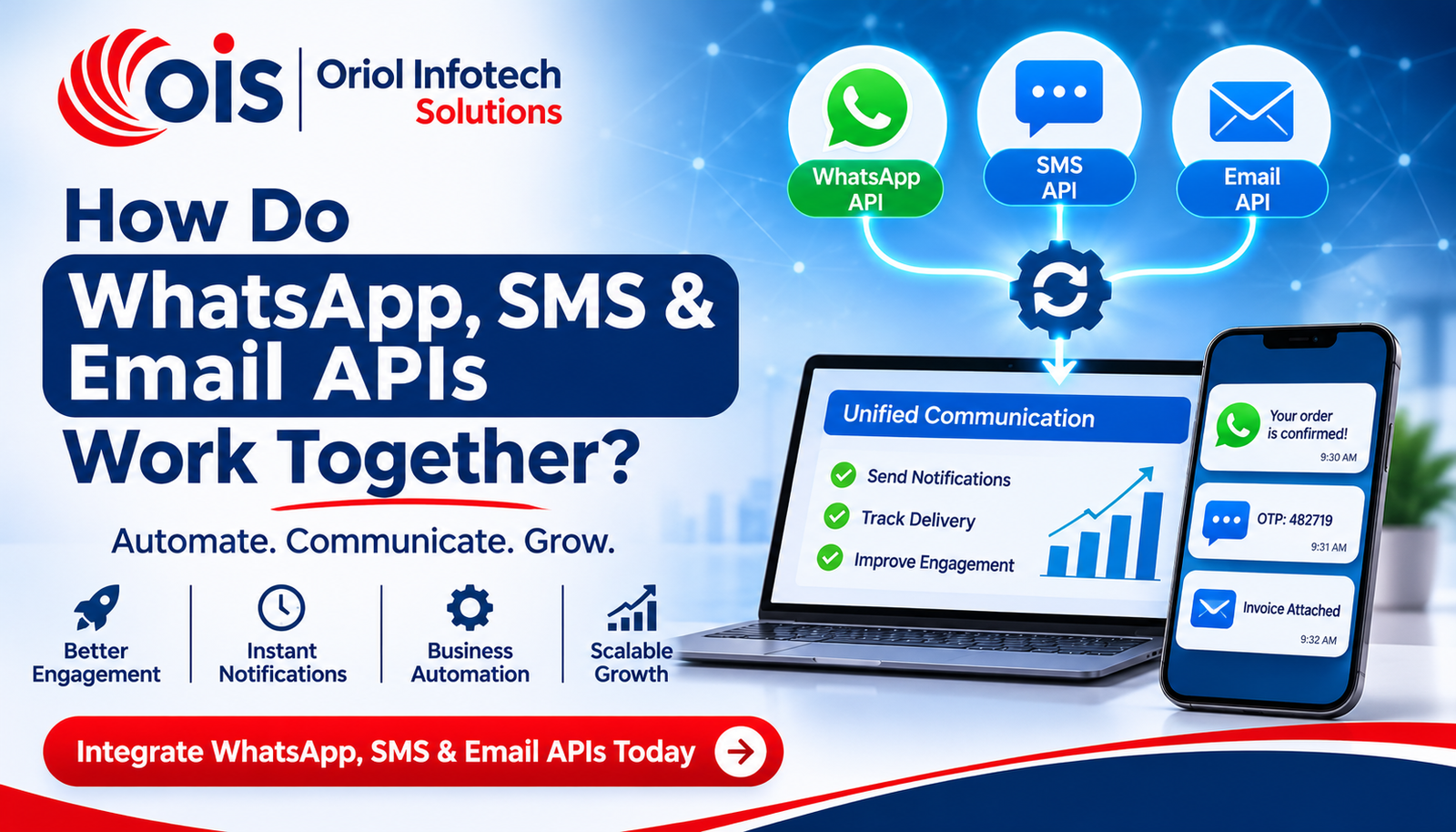
WhatsApp API can send an order confirmation.
SMS API can deliver an OTP or urgent delivery update.
Email API can send an invoice and detailed order summary.
All these actions can happen automatically through a connected system.
Each communication channel serves a different purpose, but integrating them creates a coordinated customer communication experience.
How Do WhatsApp, SMS and Email APIs Work Together?
WhatsApp, SMS, and Email APIs work together through a centralized communication system that connects different messaging providers with business applications.
The system identifies a customer action, processes the relevant information, and selects the appropriate communication channel based on predefined business rules.
Here is how the process works:
1. Customer Performs an Action
The communication process begins when a customer interacts with a business system.
Examples include:
Placing an order on an e-commerce website.
Registering for an online course.
Booking an appointment.
Making an online payment.
Creating an account.
Requesting customer support.
These actions generate events within the website, application, CRM, or ERP system.
2. The Backend System Processes the Event
Once an action occurs, the backend application identifies what type of communication is required.
For example, when a customer books an appointment, the system retrieves relevant information such as:
The system then prepares the appropriate message using predefined templates and business rules.
3. APIs Select the Communication Channel
The integration system determines which communication channel should be used.
For example:
WhatsApp for booking confirmations and interactive updates.
SMS for OTPs and urgent notifications.
Email for invoices, detailed information, and documents.
Businesses can also send the same notification through multiple channels when necessary.
4. Messaging Providers Deliver Notifications
The backend sends API requests to the respective messaging providers.
The providers process the requests and attempt to deliver the messages through their communication networks.
Delivery status, errors, and other available events can be returned to the application through API responses or webhooks.
5. Customer Receives the Message
Customers receive notifications through their selected communication channels.
They can read WhatsApp messages, receive SMS alerts, or access detailed information through email.
This creates a connected communication experience without requiring employees to manually send every notification.
Understanding the Role of Each Communication API
Although WhatsApp, SMS, and Email APIs work together, each channel has different strengths and business applications.
1. WhatsApp Business API Integration
WhatsApp Business API integration allows businesses to communicate with customers through automated WhatsApp messaging.
It is particularly useful for interactive communication, customer support, confirmations, and follow-ups.
Key applications include:
Automated order confirmations.
Appointment booking reminders.
Customer support conversations.
Lead generation and follow-ups.
Product and service updates.
AI chatbot-enabled communication.
WhatsApp also supports interactive messaging experiences through approved message templates and supported buttons.
For example, a healthcare clinic can send an appointment confirmation with relevant booking details and an option for customers to respond.
Businesses must follow applicable WhatsApp messaging policies, consent requirements, and template rules.
2. SMS API Integration
SMS API integration allows applications to send text messages automatically to customers' mobile numbers.
SMS is particularly useful for short, time-sensitive notifications.
Common applications include:
For example, when a customer logs into an online banking application, the system can trigger an SMS containing a one-time password.
SMS is also useful when businesses need to communicate important information without requiring customers to install a particular messaging application.
3. Email API Integration
Email API integration enables businesses to send automated emails directly from websites, applications, CRM platforms, and other business systems.
Email is suitable for communication that requires more detailed information or documentation.
Common applications include:
Transactional emails.
Order invoices and receipts.
Account registration confirmations.
Password reset instructions.
Marketing campaigns.
Newsletters.
Detailed product information.
For example, an e-commerce platform can automatically send a purchase receipt containing order details, billing information, and product information.
Email APIs help businesses manage large-scale communication while maintaining consistent messaging.
Real-World Example: How All Three APIs Work Together
Consider an online shopping business that wants to automate its complete customer communication process.
Without automation, employees may need to manually send order confirmations, payment updates, invoices, and delivery notifications.
With WhatsApp, SMS and Email API integration, the process becomes automated.
Benefits of Integrating WhatsApp, SMS and Email APIs
Combining multiple communication channels offers several advantages for businesses.
1. Automated Customer Communication
Businesses can automatically send notifications based on customer activities, system events, and predefined workflows.
This reduces repetitive manual tasks and allows employees to focus on important business operations.
2. Improved Customer Engagement
Customers have different communication preferences.
Some prefer WhatsApp conversations, others rely on SMS notifications, while many use email for detailed information.
Offering multiple communication options helps businesses create more convenient customer experiences.
3. Faster Notifications and Updates
Businesses can trigger notifications immediately after important events.
For example, payment confirmations, booking updates, and account alerts can be delivered automatically through the appropriate channel.
Actual delivery time depends on the provider, network conditions, and recipient availability.
4. Reduced Manual Work
Automated messaging eliminates the need for employees to manually send routine notifications.
This improves operational efficiency, especially for businesses handling large customer volumes.
5. Better Lead Management
Integrating messaging APIs with CRM software allows businesses to automate lead communication.
For example:
A new lead receives an instant WhatsApp acknowledgement.
An SMS reminder is triggered for an upcoming consultation.
An email shares detailed product or service information.
The CRM records customer interactions.
This creates a more organized lead management process.
6. Scalable Business Communication
As businesses grow, their communication requirements also increase.
API-based messaging systems allow companies to manage larger communication volumes through scalable infrastructure, subject to provider limits and applicable policies.
How to Build a Unified WhatsApp, SMS and Email Automation Workflow
A successful multi-channel communication system requires proper integration between business applications, backend services, and messaging providers.
Here are the important steps involved.
Step 1: Identify Business Communication Requirements
Start by identifying which notifications your business needs to send.
For example:
Order confirmations.
Payment notifications.
Appointment reminders.
Promotional communication.
Customer support updates.
This helps determine which API is appropriate for each communication requirement.
Step 2: Select the Right API Providers
Choose suitable WhatsApp Business Platform solutions, SMS gateway services, and email delivery platforms.
Provider selection should depend on:
Supported countries and regions.
Message delivery capabilities.
Pricing and usage limits.
Integration documentation.
Security features.
Reporting and analytics.
Compliance requirements.
Step 3: Integrate APIs with Existing Software
Connect messaging APIs with your existing business applications.
These may include:
Websites and web applications.
Android and iOS mobile applications.
CRM and ERP systems.
E-commerce platforms.
Booking and appointment systems.
Payment gateways.
SaaS applications.
A centralized backend or middleware layer can coordinate communication between these systems and different messaging providers.
Step 4: Create Automated Messaging Workflows
Define rules that determine when and how notifications should be sent.
For example:
When a customer completes a booking:
Generate a booking confirmation.
Send a WhatsApp notification.
Schedule an SMS reminder before the appointment.
Send an email containing complete booking details.
These workflows can be customized according to business requirements.
Step 5: Configure Delivery Tracking and Error Handling
A reliable integration should track message statuses and handle failed requests.
Important features include:
Webhooks are particularly useful because messaging providers can send event updates back to the business application.
Step 6: Test and Optimize the Communication System
Before launching the integration, test different customer journeys.
Check whether:
Messages are triggered correctly.
Customer details are accurate.
Templates follow provider requirements.
Failed messages are handled properly.
Duplicate notifications are prevented.
Communication preferences are respected.
Regular monitoring helps businesses maintain a reliable messaging experience.
Industry-Wise Applications of Multi-Channel Messaging APIs
Different industries can use WhatsApp, SMS, and Email APIs to automate their communication requirements.
E-commerce Businesses
Online stores can automate order confirmations, payment alerts, invoices, shipping notifications, and customer feedback requests.
Healthcare and Clinics
Healthcare providers can send appointment confirmations, consultation reminders, patient notifications, and follow-up communication.
Educational Institutions
Schools, colleges, and online learning platforms can automate admission updates, enrollment confirmations, fee reminders, examination notifications, and course announcements.
Logistics and Delivery Companies
Logistics businesses can send shipment updates, delivery notifications, tracking information, and important service alerts.
SaaS and Technology Companies
SaaS platforms can automate account verification, password resets, subscription reminders, product updates, and customer support notifications.
These applications demonstrate how WhatsApp, SMS and Email API integration can support different business operations.
Best Practices for Secure and Reliable API Integration
Security and reliability are essential when integrating multiple communication channels.
Businesses should consider the following practices:
1. Secure API Authentication: Use secure authentication methods, protect API keys, and restrict access to authorized applications.
2. Data Encryption: Protect sensitive customer information during transmission and storage using appropriate security measures.
3. Customer Consent: Follow applicable messaging regulations, obtain required permissions, and provide suitable opt-out mechanisms.
4. Message Personalization: Use accurate customer information to create relevant and meaningful notifications.
5. Delivery Monitoring: Monitor message statuses and configure suitable error-handling mechanisms.
6. Duplicate Prevention: Use event tracking and idempotency mechanisms to avoid sending repeated notifications.
7. Provider Compliance: Follow the messaging policies, rate limits, template requirements, and applicable regional regulations of each provider.
A well-designed integration should balance communication speed, customer experience, security, and compliance.
Why Choose Oriol Infotech Solutions for WhatsApp, SMS and Email API Integration?
At Oriol Infotech Solutions, we help businesses connect their communication systems with websites, mobile applications, CRM platforms, ERP software, and other business applications.
Our WhatsApp, SMS and Email API integration services are designed to automate notifications, simplify customer communication, and support business workflows.
Our integration capabilities include:
WhatsApp Business API integration.
SMS gateway and notification integration.
Email API and transactional email automation.
CRM and ERP messaging integration.
Automated customer follow-ups.
AI chatbot-enabled WhatsApp communication.
Booking and payment notification workflows.
Secure and scalable API architecture.
Message delivery tracking and error handling.
Whether you operate an e-commerce business, healthcare organization, educational institution, SaaS platform, or enterprise, we can help develop a communication solution aligned with your business requirements.
Explore our service: WhatsApp, SMS & Email API Integration Services.
Ready to automate your business communication?
Contact Oriol Infotech Solutions to discuss your requirements and build a connected messaging system for your business.
Frequently Asked Questions (FAQs)
1. How do WhatsApp, SMS and Email APIs work together?
WhatsApp, SMS, and Email APIs connect with a centralized business application that triggers notifications based on customer activities. The system selects the appropriate communication channel and sends messages automatically through the respective providers.
2. Can WhatsApp, SMS and Email APIs be integrated into one platform?
Yes. Businesses can integrate all three APIs into a single backend system or communication platform. This allows them to manage automated notifications, customer communication, and messaging workflows centrally.
3. Which is better for business communication: WhatsApp, SMS or Email?
Each channel serves a different purpose. WhatsApp is useful for interactive conversations, SMS is suitable for short and time-sensitive alerts, and email is ideal for detailed information, invoices, and documents. Businesses can combine all three according to their communication requirements.
4. Can messaging APIs integrate with CRM and ERP software?
Yes. WhatsApp, SMS, and Email APIs can be integrated with CRM and ERP systems to automate customer notifications, lead follow-ups, payment alerts, order updates, and internal business workflows.
5. Are WhatsApp, SMS and Email API integrations suitable for small businesses?
Yes. Small businesses can use messaging API integrations to automate appointment reminders, customer inquiries, payment confirmations, order updates, and marketing communication. Solutions can be designed according to business size and budget.
6. Can businesses automate customer notifications using APIs?
Yes. Businesses can configure automated workflows that trigger messages whenever specific events occur, such as customer registration, order placement, payment completion, appointment booking, or account updates.
7. Is WhatsApp Business API integration secure?
WhatsApp Business Platform provides authentication and platform-level security features. However, overall integration security also depends on how businesses manage credentials, customer data, backend systems, and access permissions.
8. How much does WhatsApp, SMS and Email API integration cost?
The cost depends on integration complexity, messaging providers, message volumes, required features, infrastructure, and ongoing maintenance. Businesses should evaluate provider charges and development costs before selecting a solution.
Conclusion
Integrating WhatsApp, SMS, and Email APIs allows businesses to create a connected communication system that automates notifications, improves customer engagement, and reduces manual work.
Each channel offers unique advantages. WhatsApp supports interactive communication, SMS delivers short and time-sensitive alerts, and email provides detailed information and documentation.
When connected through a centralized automation system, these channels help businesses deliver consistent and timely customer communication.
With Oriol Infotech Solutions, businesses can integrate messaging APIs into websites, mobile applications, CRM systems, ERP platforms, and custom software to build scalable communication workflows.
Looking to automate customer communication with WhatsApp, SMS and Email APIs? Contact Oriol Infotech Solutions and take the next step toward smarter business automation.